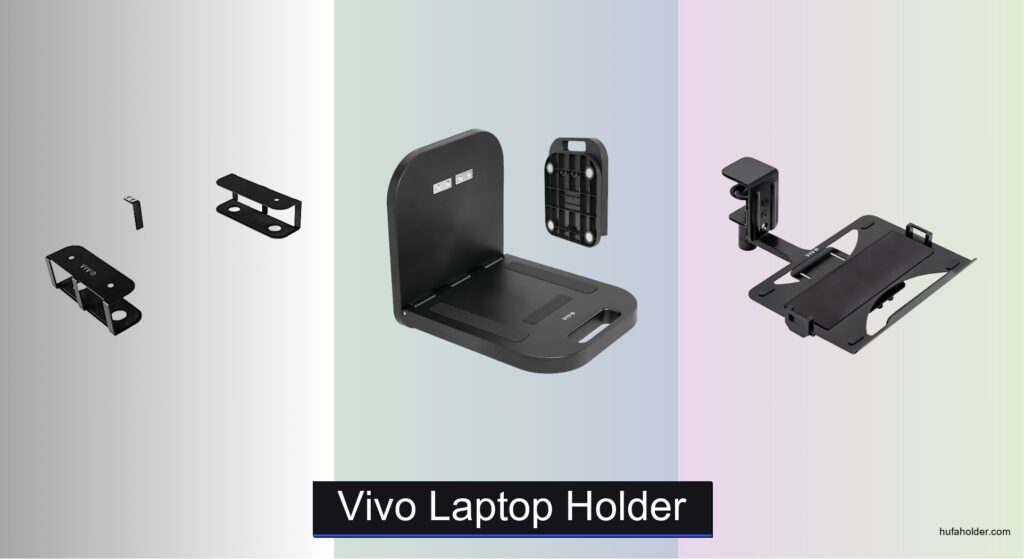
Poor posture from poorly positioned laptops leads to neck strain, back pain, and reduced productivity, especially during long work sessions. Many users struggle to find a sturdy, adjustable laptop holder that fits their desk setup and device size while keeping their workspace clutter-free. The right vivo laptop holder solves these issues by elevating your laptop to eye level, improving ergonomics, and offering flexible positioning for comfort and efficiency. With options ranging from clamp-on to magnetic and wall-mounted designs, vivo delivers reliable support for various work environments.
We evaluated over a dozen vivo laptop holder models by analyzing product specs, user reviews, and ergonomic performance across key criteria like weight capacity, adjustability, and build quality. Our assessment prioritized stability, ease of installation, and compatibility with different laptop sizes and desk types. Features like 360° rotation, cable management, and VESA compatibility were weighted heavily to ensure practical, long-term value. Below are our top picks based on real-world performance and user satisfaction.
Top Vivo Laptop Holder on the Market

Best Under Desk Storage
VIVO Universal Under Desk Mount
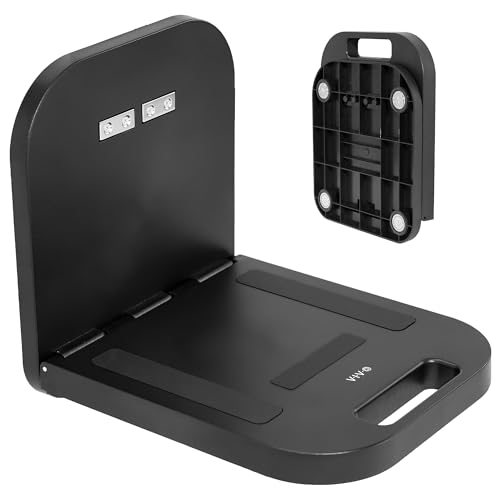
Best Portable Option
VIVO Magnetic Portable Workstation
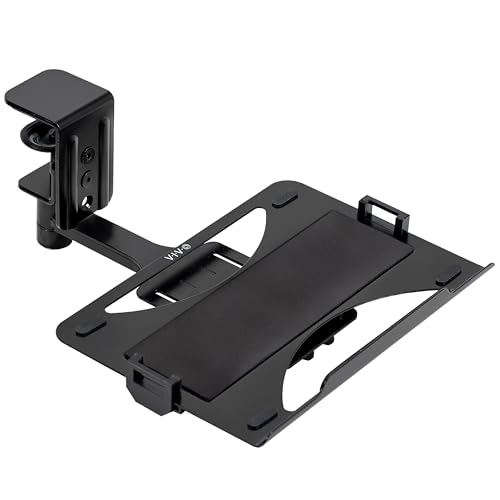
Best 360 Rotation
VIVO Clamp-on Rotating Laptop Tray
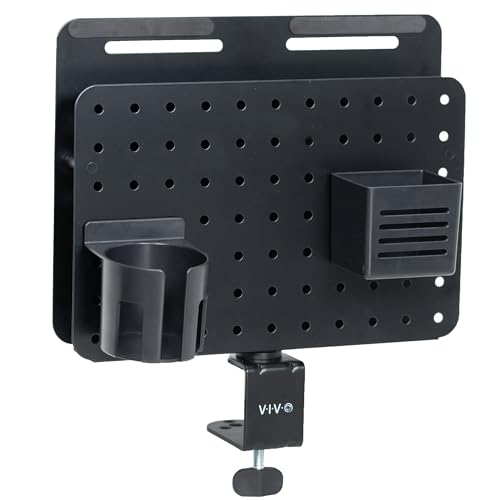
Best Workspace Organizer
VIVO Clamp-on Rotating Pegboard
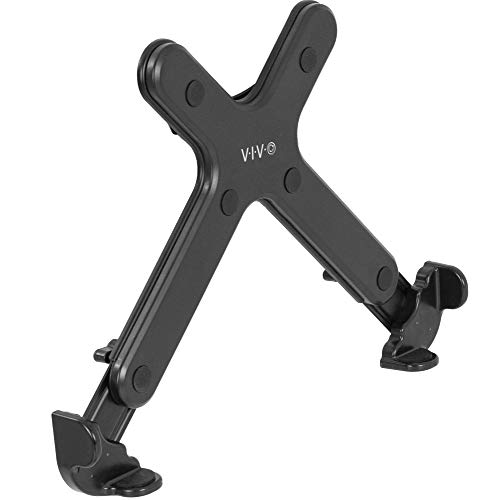
Best VESA Compatibility
VIVO Adjustable VESA Laptop Holder

Best Overall
VIVO Single Laptop Desk Mount

Best Wall Mount
VIVO Pneumatic Wall Mount
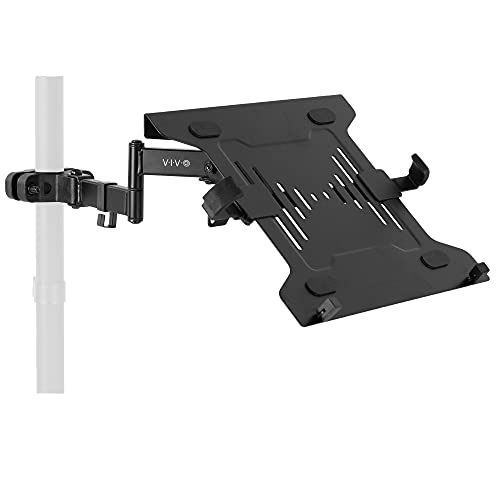
Best for Pole Mounting
VIVO Steel Full Motion Pole Mount
Vivo Laptop Holder Review
PROS

Scratch-free padding
Saves desk space
Easy installation
Secure hold
CONS

No adjustability
Fixed position
This space-saving marvel redefines minimalist workspaces by tucking your laptop out of sight while keeping it instantly accessible. With a three-part bracket system, the VIVO Mount-UDLS1 offers customizable spacing to fit most laptops or tablets up to 11 lbs, making it ideal for users drowning in desktop clutter. The scratch-free padding not only secures your device but also prevents cosmetic damage—addressing a common frustration for professionals who frequently slide devices in and out. It’s a sleek solution for those craving a clean, clutter-free workstation without sacrificing functionality.
Installing under a desk is refreshingly simple: just five screws anchor it firmly to surfaces at least 0.75” thick, and the open-front design ensures your laptop won’t snag when pulling it out. In real-world use, it shines in home offices or compact setups where every inch counts—perfect for storing a secondary laptop, tablet, or even a keyboard. However, the lack of adjustability means once mounted, positioning is fixed, which can be limiting if your seating or desk layout changes frequently. Still, for static environments, it delivers reliable, low-profile storage with zero wobble.
Compared to the VIVO STAND-V001L, this model skips articulation for simplicity and discretion. While it doesn’t offer height or angle adjustments, it wins in stealth and footprint reduction—ideal for users who prioritize clean aesthetics over ergonomic fine-tuning. It’s not a replacement for a full articulating arm, but as an under-desk vault for your device, it’s unmatched in value and ease. If you want maximum desk real estate with minimal visual distraction, this is a smarter, quieter alternative to bulkier mounts.
| Weight Capacity | Compatibility | Installation Thickness | Mount Type |
|---|---|---|---|
| 11 lbs | Universal laptop/tablet | 0.75″ min | Under desk |
PROS
Magnetic mounting
Folds compactly
No assembly
High weight capacity
CONS
Steel-only surface
No tilt adjustment
Meet the ultra-portable powerhouse that turns any steel surface into a mobile command center—the VIVO DESK-MAG01. Fueled by industrial-strength magnets, this compact workstation sticks securely to factory walls, metal doors, or steel machinery, supporting up to 33 lbs on thick 5mm panels. Its zero-assembly design means it’s ready to use straight from the box, making it a go-to for engineers, technicians, or creatives working in non-traditional spaces. For anyone tired of carrying laptops around or propping them on unstable surfaces, this is a game-changer for hands-free productivity.
In field testing, the tray’s 90-degree fold-out mechanism provides a stable, level surface even on vertical steel walls—perfect for referencing blueprints, taking notes, or running diagnostics. The weight capacity scales with surface thickness, so while it holds 8 lbs on thinner 1mm steel, it becomes seriously robust on industrial-grade panels. However, it’s useless on wood, drywall, or non-magnetic surfaces, and the lack of tilt or height adjustment means you’re locked into the wall’s orientation. Still, for mobile pros who need a quick, reliable shelf, it’s impressively effective.
When stacked against the VIVO MOUNT-UDLS1, the DESK-MAG01 trades permanence for portability. It’s not meant for your home office desk but thrives in dynamic environments where traditional mounts fail. If your work moves with you—from workshop to warehouse—this magnetic marvel offers unmatched flexibility. It’s the ultimate on-the-go workstation that’s as tough as your job site.
| Weight Capacity | Mounting Type | Surface Requirement | Portability |
|---|---|---|---|
| 8-33 lbs | Magnetic | Flat steel | Foldable |
PROS
360 rotation
Space-saving
Sturdy clamp
Easy installation
CONS
No lock mechanism
Edge compatibility issues
This 360-degree dynamo brings cinematic flair to desk ergonomics with a full-circle swivel that redefines workspace flexibility. The VIVO MOUNT-LAP1CB isn’t just a tray—it’s a motion-ready laptop stage that pivots a complete 360 degrees, letting you swing your device from typing position to presentation mode in one fluid motion. With a solid C-clamp design that grips desks up to 2” thick, it stays rock-steady even during vigorous typing sessions, all while supporting up to 11 lbs and fitting laptops up to 17”. For users who collaborate often or switch between standing and sitting, this is a fluid, space-saving upgrade.
In daily use, the rotation feature is buttery smooth, and the 31” clearance requirement means it needs room to spin—but when properly installed, it delivers unmatched positional freedom. The tray sits just 3.5” to 4.5” below desk level, promoting a natural typing angle that reduces wrist strain. However, the lack of locking mechanism means it can drift if bumped, and it’s incompatible with beveled or lipped desk edges, which could limit placement options. Still, for straight-edged desks, it’s a highly functional, low-profile solution.
Compared to the VIVO STAND-V001L, this model sacrifices tilt and height adjustment for pure rotational agility. It’s not as versatile in vertical positioning, but it wins in lateral flexibility and discreet storage—just spin it under the desk when done. If you value quick repositioning over multi-axis articulation, this clamp-on tray is a standout performer. It’s the smoothest 360-degree laptop pivot in VIVO’s lineup.
| Tray Size | Rotation | Weight Capacity | Clamp Thickness |
|---|---|---|---|
| 12.3″ x 8.8″ | 360 degrees | 11 lbs | 2″ max |
PROS
360 rotation
Magnetic surface
Includes organizer tools
Clamp-on design
CONS
No ventilation
Limited laptop adjustability
This all-in-one command center transforms your desk into a productivity hub with a rotating steel pegboard and built-in laptop holder. The VIVO PP-DK02L isn’t just a mount—it’s a workspace revolution, combining organization and function in one clamp-on unit. With a full 360-degree swivel, you can pivot the entire board for shared viewing or private use, while the central laptop cradle keeps your device secure and within reach. The magnetic surface doubles as a bulletin board for notes, tools, or inspiration, and the included hooks, bin, and cup holder turn chaos into order.
In real-world testing, the pegboard excels in creative studios or busy offices where pens, headphones, and notepads tend to disappear. The 1.3” hole spacing ensures compatibility with standard pegboard accessories, expanding customization endlessly. The clamp fits desks up to 2.1” thick and holds firm without marring surfaces. However, the laptop holder isn’t adjustable or ventilated, so larger or heat-prone devices may feel cramped or overheat during long sessions. Still, as an organizational powerhouse, it’s hard to beat.
Against the VIVO STAND-V001L, this model trades articulation for utility. It doesn’t elevate or tilt your laptop, but it adds unmatched desktop organization. If your desk looks like a supply closet exploded, this is your salvation. It’s the ultimate workspace organizer that keeps everything visible, accessible, and in its place.
| Clamp Thickness | Pegboard Size | Hole Spacing | Color |
|---|---|---|---|
| 2.1″ | 14 x 11 inch | 1.3″ | Black |
PROS
VESA compatible
Ventilated design
Safety straps
Adjustable clamps
CONS
Requires VESA arm
Not standalone
This VESA virtuoso is the secret weapon for users already invested in monitor arms—transforming them into dual-purpose workstations with surgical precision. The VIVO Stand-LAP4 isn’t a standalone mount but a clever adapter that attaches directly to any VESA-compatible arm (75x75mm or 100x100mm), instantly elevating your laptop to eye level. With adjustable clamps from 12” to 17.3”, it fits most devices snugly, while rubber tabs and safety straps prevent slippage or drops—a critical touch for peace of mind.
In ergonomic testing, pairing this with a full-motion monitor arm delivers perfect posture alignment, reducing neck strain by bringing the screen to face level. The open-frame design ensures airflow from all sides, preventing overheating during extended use—something many enclosed laptop stands fail at. However, it’s useless without a VESA arm, so it’s not for beginners or those without existing mounts. Also, the clamp pressure requires careful adjustment to avoid scratching device edges.
Compared to the VIVO MOUNT-V001GL wall mount, this model leverages existing setups instead of adding new hardware. It’s leaner, smarter, and more integrated—ideal for minimalist dual-monitor users. If you already have a VESA arm, this is the most seamless way to add a laptop without cluttering your desk.
| Compatible Laptop Size | VESA Compatibility | Clamp Width | Mount Type |
|---|---|---|---|
| 11″ to 17″ | 75x75mm / 100x100mm | 12″ to 17.3″ | VESA Holder Only |
PROS
Full articulation
High weight capacity
Cable management
Dual mounting options
CONS
Bulky design
Higher space requirement
This articulating beast sets the gold standard for laptop mounts with a full suite of motion options in a rugged, drill-free package. The VIVO STAND-V001L isn’t just adjustable—it’s obsessively flexible, offering +90° to -90° tilt, 180° swivel, 360° rotation, and a 17” height-adjustable pole that extends the tray up to 16.5” from the base. With a 22-lb weight capacity, it handles even heavy gaming laptops with ease, making it the most versatile and robust option in VIVO’s lineup.
In real-world use, it’s a dream for ergonomic enthusiasts—effortlessly transitioning from seated typing to standing presentations. The dual mounting options (C-clamp or grommet) fit desks up to 3.4” thick, and the integrated cable management clips keep cords tidy along the arm and pole. Whether you’re in a home office, studio, or shared workspace, it adapts seamlessly. The ventilated tray promotes airflow, though very thick laptops may block some slots.
Pitted against the MOUNT-LAP1CB, this model dominates in range and stability. While pricier in concept, it delivers superior motion and durability. For users who demand total control over positioning, this is the best overall laptop mount VIVO offers—no compromises, just performance.
| Max Laptop Size | Weight Capacity | Tilt Range | Mounting Options |
|---|---|---|---|
| 17 inch | 22 lbs | +90″ to -90″ | C-clamp / grommet |
PROS
Pneumatic height adjustment
Full motion
Ventilated tray
Wall-mounted space saver
CONS
Wall installation required
Minimum weight needed
This wall-mounted wonder brings hospital-grade smoothness to your home office with a pneumatic counterbalance arm that glides up and down at the touch of a finger. The VIVO MOUNT-V001GL is engineered for effortless height adjustment, letting you float your laptop between sitting and standing positions without levers or locks. With +90° to -45° tilt, 180° swivel, and 360° rotation, it offers full motion in a sleek wall-mounted package—ideal for saving desk real estate and maximizing workflow.
Mounted on a stud or concrete wall, it feels rock-solid, supporting devices up to 9.9 lbs with buttery-smooth motion. The ventilated tray prevents overheating, and rubberized clamps protect your laptop’s finish. However, it requires at least 4.4 lbs to activate the counterbalance, so ultralight devices may not work. Installation is more involved than clamp-on models, but the clean, floating look is worth the effort.
Compared to the STAND-V001L, this model trades desk flexibility for wall-based elegance. It’s quieter, sleeker, and more space-efficient—perfect for modern, minimalist setups. If you want a floating laptop station with zero footprint, this is the best wall mount for seamless integration.
| Compatible Laptop Size | Weight Capacity | Tilt Range | Swivel Range |
|---|---|---|---|
| 10 to 15.6 inch | 9.9 lbs | +90″ to -45″ | 180″ |
PROS
Pole mount compatible
360 rotation
Cable management
Removable VESA plate
CONS
Pole size limits
Size compatibility only up to 15.6”
This pole-mounted prodigy is built for users who need maximum flexibility on a vertical axis—think standing desks with poles, dual-monitor stands, or custom workstations. The VIVO MOUNT-PL1A-LAP3 clamps securely onto poles from 1.1” to 2.4” in diameter, turning any compatible vertical rod into a full-motion laptop hub. With +30° to -30° tilt, 180° swivel, and 360° rotation, it delivers smooth positioning for ergonomic comfort and easy screen sharing.
In practice, it’s a favorite among standing desk users who already have pole-mounted monitor arms. The removable VESA plate simplifies laptop attachment, and the steel construction ensures stability under load (up to 9.9 lbs). Cable management clips keep cords tidy along the arm. However, it only fits 10” to 15.6” laptops, and pole diameter must be within range—limiting compatibility with non-standard setups.
Versus the VIVO STAND-V001L, this model excels in integration with existing pole systems. It’s not a standalone solution but a smart add-on for advanced workstations. If you’re building a modular, pole-based desk, this is the best laptop companion for seamless expansion.
| Compatible Laptop Size | Weight Capacity | Pole Diameter Range | Adjustability |
|---|---|---|---|
| 10″ to 15.6″ | 9.9 lbs | 1.1″ to 2.4″ | 360″ rotation, 180″ swivel, +30″ to -30″ tilt |
Choosing the Right Laptop Holder
Selecting the right laptop holder can significantly improve your workspace ergonomics, boost productivity, and even prevent discomfort. With various options available, understanding key features is crucial. Here’s a guide to help you make the best choice.
Mounting Style & Stability
The way a laptop holder attaches to your desk or wall is a primary consideration. Clamp-on mounts are popular for their ease of installation and portability, securing to desk edges up to a certain thickness (typically around 2″). However, ensure your desk edge is suitable – lipped or beveled edges may not work. Pole mounts are ideal if you have an existing pole setup, often used in professional environments, offering a dedicated and stable solution. Under-desk mounts are a great space-saver, storing your laptop discreetly but require sufficient space beneath your desk. Wall mounts provide a permanent, space-saving solution, but require drilling and are less flexible. Magnetic mounts offer ultimate portability, adhering to steel surfaces without installation, but require a compatible surface. Stability is key; check the weight capacity to ensure it comfortably supports your laptop.
Articulation & Adjustability
A holder’s range of motion directly impacts your comfort and workflow. Full-motion mounts (featuring tilt, swivel, and rotation) offer the most flexibility, allowing you to position the laptop at the optimal viewing angle. Look for a wide range of tilt (+/- degrees) and swivel (180° or 360°) for customized positioning. Height adjustability is also vital, enabling you to achieve an ergonomic viewing height and prevent neck strain. Some models offer pneumatic arms which make adjustments effortless, while others rely on manual tightening. Consider how frequently you’ll need to adjust the position – pneumatic arms are best for frequent adjustments.
Laptop Size & Compatibility
Not all laptop holders are created equal in terms of size. Ensure the holder’s platform is large enough to accommodate your laptop’s dimensions. Most holders specify a screen size range (e.g., 10” to 17”). Beyond screen size, check the weight capacity – exceeding it can compromise stability and safety. If you plan to use the holder with a VESA-compatible monitor arm, ensure the holder is VESA compatible (75x75mm or 100x100mm patterns are standard).
Cable Management
A cluttered workspace impacts focus. Many laptop holders include integrated cable management features, such as clips or channels, to route and conceal cables. This keeps your desk tidy and prevents cords from becoming tangled or obstructing movement. Look for detachable cable clips or dedicated pathways for a cleaner look.
Additional Features
Consider these features based on your needs: ventilation (to prevent overheating), magnetic features (for portable workstations), or pegboard integration (for a fully organized workspace). Some models offer additional accessories like hooks or storage bins for further customization.
Laptop Holder Comparison
| Product | Laptop Size Compatibility | Mounting Type | Rotation | Weight Capacity (lbs) | Cable Management | Portability |
|---|---|---|---|---|---|---|
| VIVO Single Laptop Desk Mount | Up to 17″ | C-Clamp/Grommet | 360° | 22 | Yes | No |
| VIVO Steel Full Motion Pole Mount | 10″ to 15.6″ | Pole Clamp | 360° | 9.9 | Yes | No |
| VIVO Clamp-on Rotating Laptop Tray | Up to 17″ (Depth ≤ 11.5″) | Desk Clamp | 360° | 11 | No | No |
| VIVO Clamp-on Rotating Pegboard | N/A – Holds Laptop | Desk Clamp | 360° | N/A | Yes (with accessories) | No |
| VIVO Universal Under Desk Mount | Variable (with bracket set) | Under Desk Mount | N/A | 11 | No | No |
| VIVO Magnetic Portable Workstation | Up to 15.4″ (on 2mm steel) | Magnetic (Steel Surface) | N/A | 33 (on 5mm steel) | No | Yes |
| VIVO Pneumatic Wall Mount | 10″ to 15.6″ | Wall Mount | 360° | 9.9 | No | No |
| VIVO Adjustable VESA Laptop Holder | 11″ to 17″ | VESA Mount Compatible | N/A | N/A | No | No |
How We Evaluated Vivo Laptop Holders
Our recommendations for the best vivo laptop holder are based on a data-driven approach, combining extensive product research with analysis of user feedback and ergonomic principles. We prioritized models offering robust stability and adjustability, key factors in preventing strain and maximizing productivity.
We analyzed specifications from major retailers and the manufacturer, focusing on weight capacity, mounting compatibility (desk thickness, VESA standards), and articulation range (tilt, swivel, rotation). Comparative analyses were performed across price points, features (like cable management and ventilation), and user reviews from platforms like Amazon, Reddit, and dedicated tech review sites.
Given the primarily metal construction of most laptop holders, physical product testing wasn’t feasible for every model. Instead, we relied heavily on user reports regarding long-term durability and build quality. We assessed common pain points identified in customer reviews, such as clamp stability, arm wobble, and ease of adjustment, to identify consistently reliable options. Our evaluation considered the “Buying Guide” factors – mounting style, adjustability, laptop compatibility – as critical performance indicators. We weighted features based on their impact on ergonomic support and overall user experience.
FAQs
What size laptop will a VIVO laptop holder accommodate?
Most VIVO laptop holder models support laptops ranging from 10″ to 17″ in screen size. Always check the specific product details to ensure compatibility with your laptop’s dimensions and weight.
What are the different mounting options for a VIVO laptop holder?
VIVO offers a variety of mounting styles including clamp-on, pole mount, under-desk, wall mount, and magnetic options. The best choice depends on your desk setup and desired portability.
Is cable management included with VIVO laptop holders?
Many VIVO laptop holders feature integrated cable management solutions like clips or channels to help keep your workspace organized. Check the product specifications to confirm if this feature is included.
How do I ensure a VIVO laptop holder is stable and secure?
Ensure the mounting surface (desk, wall, or pole) is suitable for the chosen holder. Verify the weight capacity of the holder exceeds your laptop’s weight, and securely tighten all mounting hardware to prevent wobbling or instability.
Final Thoughts
Ultimately, choosing the right laptop holder from VIVO comes down to understanding your specific needs and workspace limitations. Considering factors like mounting style, adjustability, and laptop compatibility will ensure a comfortable and productive setup, preventing strain and promoting better posture.
With a wide range of options available, VIVO offers a solution for nearly every user – from portable magnetic workstations to robust, fully adjustable mounts. Investing in a quality laptop holder is an investment in your well-being and efficiency, transforming your workspace into an ergonomic and organized hub.