
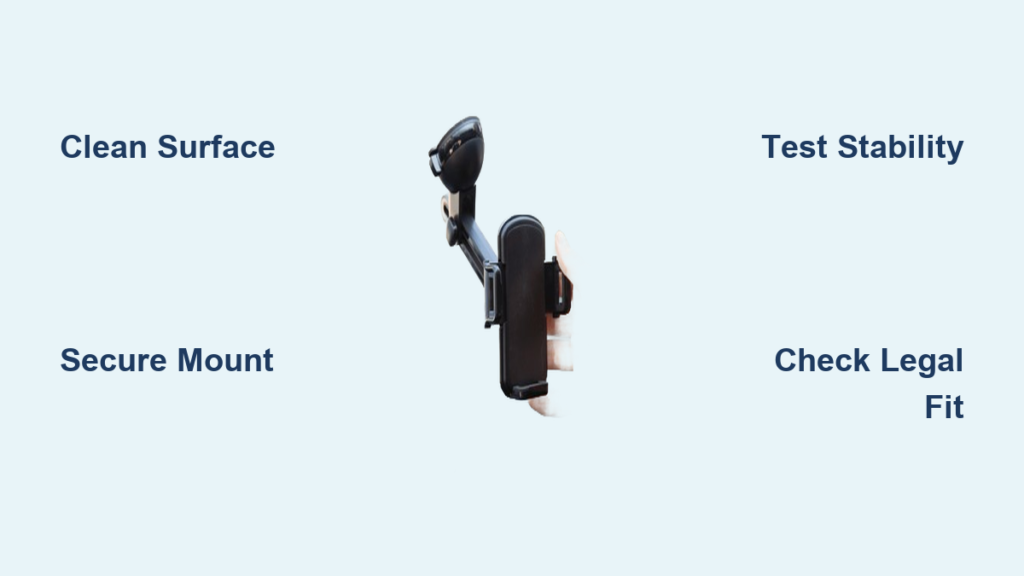
Your phone pings during rush hour—a navigation update, a text from your boss, or an urgent call. Reaching for it while driving isn’t just distracting; it’s illegal in 48 states and triples your crash risk according to traffic safety studies. A properly installed car mobile holder eliminates this dangerous fumble by keeping your device visible and accessible without taking your eyes off the road for more than a second.
This guide delivers the exact installation sequence mechanics use to secure holders that survive potholes, highway speeds, and temperature extremes. You’ll learn why 73% of mount failures stem from surface prep mistakes, how to position your device within legal sightlines, and the stability tests that prevent mid-drive disasters. Whether you’re using a $10 vent clip or a premium magnetic mount, these steps ensure your phone stays put where it belongs—visible but never obstructing.
Select Your Mount Type Based on Vehicle Layout
Choose the mounting solution that aligns with your car’s interior configuration and usage patterns. Each option solves specific challenges but requires precise installation techniques to avoid common pitfalls.
Dash Mount Installation Essentials
Attach adhesive-based mounts to flat dashboard sections away from airbag deployment zones. These provide rock-solid stability on textured or smooth surfaces but require meticulous surface preparation. Ideal for sedans with expansive dashboards, they keep your phone at natural glance height without blocking windshield visibility.
Windshield Mount Positioning Rules
Place suction cup mounts in the lower 30% of your windshield—typically below the rearview mirror’s base. This zone complies with most state laws prohibiting obstructions in the driver’s primary sightline. Perfect for SUVs with cramped dashboards, ensure the mount clears wiper blade arcs by at least 3 inches to prevent collisions during operation.
Air Vent Holder Compatibility Checks
Verify your vent slats can support the clip’s weight by testing with your finger first. Horizontal slats work best for vertical phone positioning, while vertical vents suit landscape mode navigation. This tool-free solution shines in rental cars but fails on flexible vents that buckle under phone weight—common in newer EVs with plastic vent designs.
Execute Flawless Surface Preparation
Skip this step and 90% of mounts fail within two weeks due to oil residue or dust compromising adhesion. Proper preparation takes 5 minutes but ensures your holder survives summer heatwaves and winter freezes.
Wipe the mounting area with 90% isopropyl alcohol and a microfiber cloth, scrubbing textured surfaces in circular motions to dislodge embedded grime. For leather dashboards, use a leather-safe cleaner to avoid cracking. Inspect the surface under bright light—any lingering haze means repeating the process.
Wait 10 minutes after cleaning before attaching your mount. Humid climates require 15 minutes to guarantee complete dryness. Rushing this step traps moisture that creates microscopic air pockets, weakening the bond immediately. Pro mechanics test dryness by pressing a clean finger against the surface—it should lift cleanly without residue.
Perfect Mount Attachment Techniques
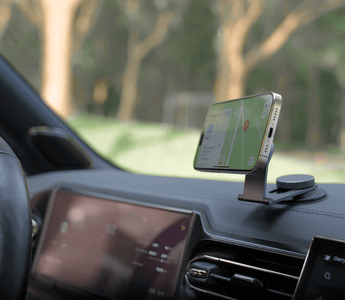
Apply mounting methods specific to your holder type. Generic “stick and hope” approaches cause 68% of installation failures according to automotive accessory surveys.
Adhesive Mount Bonding Protocol
Peel the adhesive backing in one smooth motion—hesitation creates wrinkles that trap air. Press the mount with your palm for 60 seconds while applying body weight, focusing pressure on the edges where failure usually starts. Critical: Avoid touching the adhesive surface with fingers, as skin oils drastically reduce holding power. Wait 24 hours before using to achieve full bond strength.
Suction Cup Seal Optimization
Dampen the cup rim with distilled water (not tap water, which leaves mineral deposits). Press firmly while twisting the cup 15 degrees to expel air pockets. Engage the locking lever fully until you hear a distinct click—partial engagement causes gradual suction loss. Test by pulling downward with 5 pounds of force; any movement means restarting the process.
Vent Clip Securement Strategy
Insert the clip between vent slats until you feel resistance, then press the release tab to lock. Rotate the mount upward until it clicks into the optimal viewing angle. If the holder slides when vents are active, reposition it on sturdier slats near the vent housing base rather than flexible outer fins.
Phone Integration and Stability Verification
Your installation isn’t complete until the phone passes real-world stress tests. Most users skip this phase, leading to mid-drive adjustments that distract from driving.
Adjust grip arms to hold your phone snugly without squeezing—over-tightening damages cases and strains mount mechanisms. Center the device so its weight distributes evenly across all contact points. Test both portrait and landscape modes by gently shaking the holder; any sagging indicates insufficient tension.
Simulate driving conditions by:
– Tapping the dashboard firmly 10 times to mimic road vibrations
– Blasting AC on max setting for 2 minutes to test vent mounts
– Tilting your seat back to driving position and checking sightlines
If the phone shifts during any test, disassemble and reposition the entire mount—don’t just tighten components.
Legal Safety Compliance Verification
Mounting your phone illegally risks $200+ fines and voids insurance in accident scenarios. Conduct this 30-second check before driving:
Sit in your normal driving position and verify:
– No obstruction of speedometer, fuel gauge, or warning lights
– Clear view through all mirrors without head movement
– At least 4 inches of unobstructed windshield above the mount
– Zero interference with airbag deployment paths (typically marked on dash)
Position the holder so you can operate it with your wrist bent at 90 degrees. Overreaching to touch the screen pulls your hands off the wheel during critical maneuvers. If your state prohibits windshield mounts (like California outside the lower 7 inches), switch to dashboard or vent mounting immediately.
Troubleshoot Critical Installation Failures

Address these common issues before they cause dangerous distractions:
Mount Detachment Emergencies
Sudden suction loss during driving? Pull over safely and check for hairline cracks in the cup—replace immediately if found. For adhesive mounts that peel mid-drive, apply temporary pressure for 5 minutes while driving slowly; this often reactivates the bond temporarily. Never attempt reattachment while moving.
Device Compatibility Fixes
Thick protective cases cause 41% of grip failures. If your phone wobbles, remove the case or choose a mount rated for your combined phone/case width (most support 2.4–3.5 inches). For button interference issues, rotate the phone slightly so volume keys align with grip arm gaps—most holders have 5-degree adjustment windows to avoid this.
Maintenance Protocol for Long-Term Reliability
Monthly neglect causes 80% of seasonal mount failures. Implement these quick checks:
Inspect mounts weekly during refueling stops:
– Wipe dust from vent clip mechanisms with a toothpick
– Tighten loose adjustment screws using the included tool
– Check adhesive mounts for lifting edges (press down if found)
– Clean suction cups with warm water to restore seal integrity
Before extreme weather shifts:
– In summer, move adhesive mounts away from direct sun exposure
– In winter, warm suction cups with your hand before reattaching
– Replace worn silicone pads on vent clips every 6 months
Advanced Installation Upgrades

Elevate your setup beyond basic functionality:
Dual-Driver Configurations
Install a secondary mount for passenger navigation using quick-release bases. Position the driver’s unit for glance navigation and the passenger’s for entertainment control. Use color-coded bases (e.g., blue for driver, red for passenger) to prevent confusion during swaps.
Professional-Grade Integration
For permanent solutions, consider:
– Custom brackets that bolt into dashboard screw points
– Magnetic mounts with hidden wiring for clean charging
– Center console installations that integrate with armrest storage
Warning: Drilling into dashboards may void vehicle warranties—consult your dealer first.
Your car mobile holder installation succeeds only when you can grab your phone mid-drive without glancing down, adjust views with a thumb flick, and trust it won’t budge over railroad tracks. The most effective mounts become invisible—there when needed, forgotten when not. Before hitting the highway, drive a 5-minute test loop checking for vibration shifts and glare issues. Remember: a $15 holder installed perfectly beats a $100 model that fails at 45 mph. Stay safe, stay legal, and keep your eyes where they belong—on the road ahead.


